VPN with HSRP High Availability
The purpose of HSRP (Hot Standby Routing Protocol) is to check interfaces and other connectivity parameters, and if the interface is down then a failover takes place from Active HSRP Router to standby HSRP router. There is no direct correlation between HSRP and IPSEC. However, we can use HSRP to provide VPN tunnel failover, as we will explain in the example diagram below.
For example assume the following scenario: A site-to-site IPSEC VPN is terminated on a router which happens to be the active HSRP router on a failover pair. If this router fails, then IPSEC must be immediately switched to HSRP standby Router. On diagram below, VIP means HSRP Virtual IP address.
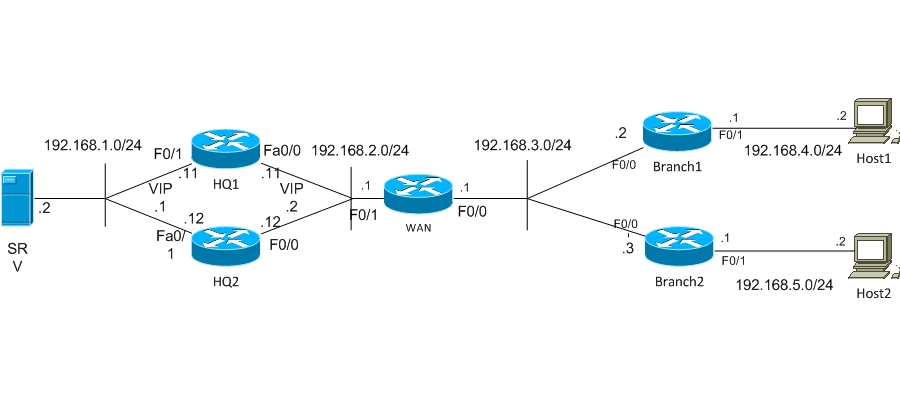
Equipment used in This lab: HQ1 and HQ2 – c3725-advsecurityk9-mz.124-1c The rest – 2691 IOS c2691-adventerprisek9-mz.123-17a
LAB Scenario:
We’ve got HQ with two HSRP routers, and two Remote Offices. The PCs in Branches must have access to servers located in HQ. Therefore the connection must be using high availability and be secured, that’s why two routers are located in HQ, which provide high availability and VPN Termination.
First of all I’ve started EIGRP on external interfaces of Branches (Fa0/0) and on all interfaces of WAN Router. I’ll not talk about how I did that. That step was only necessary to establish full routing connectivity for my lab scenario.
HQ Routers Configuration: For providing high availability on HQ’s LAN interface, HSRP should be used. I’ve configured high priority on HQ1 (value 145) for becoming Active Router, and Standby Router HQ2 has priority 140. Virtual IP address is 192.168.1.1. Also I’ve configured tracking of Fa0/0 and Fa0/1, which means that if Fa0/0 or Fa0/1 goes down, then priority of Router will decrease by 10, and if both of them go down, priority will decrease by 20. In our case if Fa0/0 or Fa0/1 on HQ1 goes down, this means that priority of HQ1 will be less than the priority of HQ2, therefore HQ2 will become the active device.
The Command “preempt” gives opportunity to router to become active if this router has higher priority than an existing one. For example: in our case when the lost interfaces on HQ1 come up again, the preempt command will bring HQ1 as active again.
hq1#show running-config interface fastEthernet 0/1 interface FastEthernet0/1 ip address 192.168.1.11 255.255.255.0 standby 1 ip 192.168.1.1 standby 1 priority 145 standby 1 preempt standby 1 track FastEthernet0/1 standby 1 track FastEthernet0/0
hq2#show running-config interface fastEthernet 0/1 interface FastEthernet0/1 ip address 192.168.1.12 255.255.255.0 standby 1 ip 192.168.1.1 standby 1 priority 140 standby 1 preempt standby 1 track FastEthernet0/0 standby 1 track FastEthernet0/1
! Configuration on WAN side is the same as on LAN. HSRP with the same priorities is on this interface as well. hq1#show running-config interface fastEthernet 0/0 interface FastEthernet0/0 ip address 192.168.2.11 255.255.255.0 standby 2 ip 192.168.2.2 standby 2 priority 145 standby 2 preempt standby 2 track FastEthernet0/1 standby 2 track FastEthernet0/0
hq2#show running-config interface fastEthernet 0/0
interface FastEthernet0/0 ip address 192.168.2.12 255.255.255.0 standby 2 ip 192.168.2.2 standby 2 priority 140 standby 2 preempt standby 2 track FastEthernet0/0 standby 2 track FastEthernet0/1
! Verify HSRP Configuration. Now active router for Group 1 and 2 are HQ1 and HQ2 is Standby.
hq1#show standby brief P indicates configured to preempt. Interface Grp Prio P State Active Standby Virtual IP Fa0/0 2 145 P Active local 192.168.2.12 192.168.2.2 Fa0/1 1 145 P Active local 192.168.1.12 192.168.1.1
hq2#show standby brief P indicates configured to preempt. Interface Grp Prio P State Active Standby Virtual IP Fa0/0 2 140 P Standby 192.168.2.11 local 192.168.2.2 Fa0/1 1 140 P Standby 192.168.1.11 local 192.168.1.1
! Now lets configure Crypto isakmp policy on HQ1 and HQ2 . Let’s use the most light policy and also indicate KEY as well.
crypto isakmp policy 10 encr 3des hash md5 authentication pre-share group 2 crypto isakmp key 123 address 0.0.0.0 0.0.0.0 crypto isakmp invalid-spi-recovery
! Create access list, by which the traffic, going through the VPN Tunnel, will be matched. In this case traffic going from 192.168.1.0/24 to 192.168.4.0/24 and 192.168.5.0/24 networks. ip access-list extended vpn permit ip 192.168.1.0 0.0.0.255 192.168.5.0 0.0.0.255 permit ip 192.168.1.0 0.0.0.255 192.168.4.0 0.0.0.255
! Create IPSEC Transform-set and dynamic crypto map. crypto ipsec transform-set ts esp-3des esp-md5-hmac
crypto dynamic-map vpn 10 set transform-set ts match address vpn reverse-route
crypto map dynmap 10 ipsec-isakmp dynamic vpn
! Let’s consider the most interesting part, where we must do correlation between HSRP and IPSEC. Create a name of HSRP group and attach crypto map to HSRP group. After this we must assign HSRP virtual address to Branches in VPN Peer Addresses. When Active HSRP router switches to Standby Router, VPN tunnels will be switched from HSRP active router to HSRP Standby router as well. interface FastEthernet0/0 standby 2 name VPNHA crypto map dynmap redundancy VPNHA
The above concludes the configuration of HQ Routers. Let’s look at configuration of Branches. There is a standard configuration on Branches and in fact nothing is changed. Just remember that the peer address of the VPN tunnel in branches must be the VIP HSRP address of the HQ routers.
Branch Routers Configuration: ! Configure crypto isapkmp policy crypto isakmp policy 10 encr 3des hash md5 authentication pre-share group 2
!set remote Peer IP address. In this case this will be the HSRP Virtual ip address. crypto isakmp key 123 address 192.168.2.2
!create IPsec Transform set. crypto ipsec transform-set ts esp-3des esp-md5-hmac ! !For Branch 1 Create Access-list which matches Interesting Traffic for VPN Tunnel. ip access-list extended vpn permit ip 192.168.4.0 0.0.0.255 192.168.1.0 0.0.0.255
!For Branch 2 Create Access-list which matches Interesting Traffic for VPN Tunnel. ip access-list extended vpn permit ip 192.168.5.0 0.0.0.255 192.168.1.0 0.0.0.255
! Create crypto map. In peer we indicate HSRP Virtual IP address. All the rest are not changed. Also turn on Reverse route, because when VPN tunnel is established, in Branches’ routing table the VPN Tunnel Destination network will be added statically. crypto map vpn 10 ipsec-isakmp set peer 192.168.2.2 set transform-set ts match address vpn reverse-route
First check VPN, ping SRV from Host1 and Host2 and see if VPN establishes and the traffic we want is matched.
host1#ping 192.168.1.2 Type escape sequence to abort. Sending 5, 100-byte ICMP Echos to 192.168.1.2, timeout is 2 seconds: ..!!!
branch1#show crypto isakmp sa dst src state conn-id slot 192.168.2.2 192.168.3.2 QM_IDLE 1 0
branch1#show crypto ipsec sa interface: FastEthernet0/0 Crypto map tag: vpn, local addr. 192.168.3.2
protected vrf: local ident (addr/mask/prot/port): (192.168.4.0/255.255.255.0/0/0) remote ident (addr/mask/prot/port): (192.168.1.0/255.255.255.0/0/0) current_peer: 192.168.2.2:500 PERMIT, flags={origin_is_acl,} #pkts encaps: 15, #pkts encrypt: 15, #pkts digest 15 #pkts decaps: 13, #pkts decrypt: 13, #pkts verify 13 #pkts compressed: 0, #pkts decompressed: 0 #pkts not compressed: 0, #pkts compr. failed: 0 #pkts not decompressed: 0, #pkts decompress failed: 0 #send errors 4, #recv errors 0
branch1#show access-lists vpn Extended IP access list vpn 10 permit ip 192.168.4.0 0.0.0.255 192.168.1.0 0.0.0.255 (32 matches)
host2#ping 192.168.1.2 Type escape sequence to abort. Sending 5, 100-byte ICMP Echos to 192.168.1.2, timeout is 2 seconds: .!!!!
branch2#show crypto isakmp sa dst src state conn-id slot 192.168.2.2 192.168.3.3 QM_IDLE 1 0
branch2#show crypto ipsec sa interface: FastEthernet0/0 Crypto map tag: vpn, local addr. 192.168.3.3
protected vrf: local ident (addr/mask/prot/port): (192.168.5.0/255.255.255.0/0/0) remote ident (addr/mask/prot/port): (192.168.1.0/255.255.255.0/0/0) current_peer: 192.168.2.2:500 PERMIT, flags={origin_is_acl,} #pkts encaps: 19, #pkts encrypt: 19, #pkts digest 19 #pkts decaps: 19, #pkts decrypt: 19, #pkts verify 19 #pkts compressed: 0, #pkts decompressed: 0 #pkts not compressed: 0, #pkts compr. failed: 0 #pkts not decompressed: 0, #pkts decompress failed: 0 #send errors 1, #recv errors 0
branch2#show access-lists vpn Extended IP access list vpn 10 permit ip 192.168.5.0 0.0.0.255 192.168.1.0 0.0.0.255 (39 matches)
We see that everything is working as we want. Now let’s see how High availability is working. Ping SRV from Host1 and at the same time let’s switch off Fa0/1 on HQ1 and see how this switching will be done.
host1#ping 192.168.1.2 repeat 100000 Type escape sequence to abort. Sending 100000, 100-byte ICMP Echos to 192.168.1.2, timeout is 2 seconds: !!!!!!!!!!!!!!!!!!!!!!!!!!!!!!!!!!!…………………………….. ….!!!!!!!!!!!!!!!!!!!!!!!!!!!!!!!!!!!!!!!!!!!!!!!!!!!!!!!!!!!!!!!!!! !!!!!!!!!!!!!!!!!!!!!!!!!!. Success rate is 76 percent (127/167), round-trip min/avg/max = 8/52/172 ms
hq1#show crypto isakmp sa dst src state conn-id slot status 192.168.2.2 192.168.3.2 QM_IDLE 1 0 ACTIVE 192.168.2.2 192.168.3.3 QM_IDLE 2 0 ACTIVE
hq1#show standby brief P indicates configured to preempt. | Interface Grp Prio P State Active Standby Virtual IP Fa0/0 2 135 P Standby 192.168.2.12 local 192.168.2.2 Fa0/1 1 135 P Init unknown unknown 192.168.1.1
hq2#show crypto isakmp sa dst src state conn-id slot status 192.168.2.2 192.168.3.2 QM_IDLE 1 0 ACTIVE
hq2#show standby brief P indicates configured to preempt. | Interface Grp Prio P State Active Standby Virtual IP Fa0/0 2 140 P Active local 192.168.2.11 192.168.2.2 Fa0/1 1 140 P Active local unknown 192.168.1.1
High availability is working as we planned. As a result of shutting down, some pings failed and soon switching occurred to HSRP Standby router and connection was established again.

